雪崩效应与熔断机制
雪崩效应:
服务提供者的不可用原因导致服务调用者的不可用结果,并且不可用的状态逐渐放大的现象。
3.1、Hystrix熔断器
Hystrix(豪猪)是Netflix开源的熔断器组件,用于为微服务提供熔断机制预防雪崩,保护整体微服务架构的健康。
Hystrix功能
- 预防微服务由于故障,请求长时间等待导致Web容器线程崩溃
- 提供故障备选方案,通过回退(fallback)机制提供”服务降级”
- 提供监控仪表盘,实时监控运行状态
Hystrix工作原理
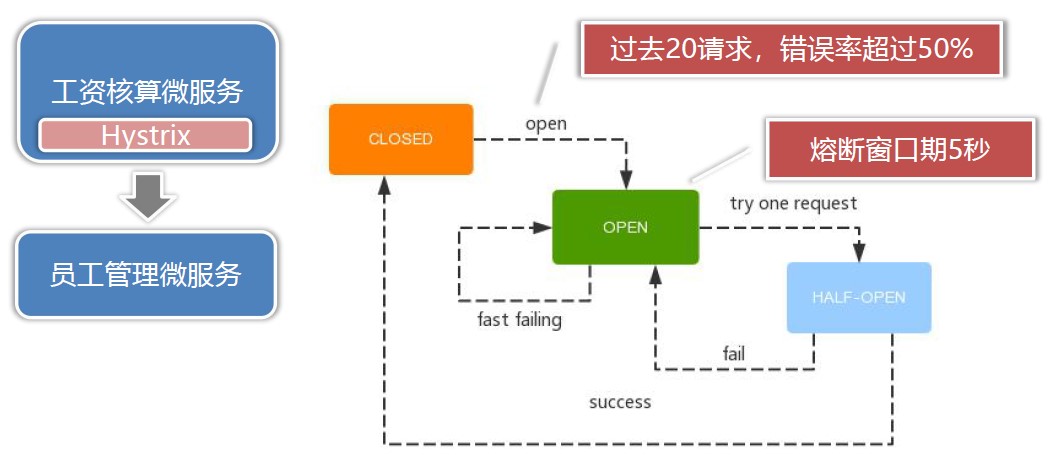
Hystrix组件用于调用者一方,如上图,在工资核算调用员工管理微服务,Hystrix配置在工资核算服务中。Hystrix有三种状态:Closed、OPEN、HALF-OPEN,默认状态是Closed,一个Rolling Window(滑动窗口)的时间内(默认:10秒),最近20次请求中,错误率(服务降级)若超过50%,则触发熔断5秒,期间快速失败。此时Hystrix状态会变为Open,当5秒熔断窗口期过了,此时工资核算服务向员工管理服务发送一个请求,此时Hystrix状态转为HALF-OPEN,如果此次请求成功(1s内),则Hystrix状态转为CLOSED,反之则重新转为OPEN。
触发服务降级的情况
FAILURE: 执行失败,抛出异常TIMEOUT: 执行超时(默认1秒)SHORT_CIRCUITED: 熔断器状态为OpenTHREAD_POOL_REJECTED: 线程池拒绝SEMAPHORE_REJECTED: 信号量拒绝
3.2、RestTemplate与Hystrix整合
模拟业务场景:图书到货通知,会员管理服务,请求短信服务发送短信通知会员,新书已到。
创建短信服务
-
pom.xml<?xml version="1.0" encoding="UTF-8"?> <project xmlns="http://maven.apache.org/POM/4.0.0" xmlns:xsi="http://www.w3.org/2001/XMLSchema-instance" xsi:schemaLocation="http://maven.apache.org/POM/4.0.0 https://maven.apache.org/xsd/maven-4.0.0.xsd"> <modelVersion>4.0.0</modelVersion> <parent> <groupId>org.springframework.boot</groupId> <artifactId>spring-boot-starter-parent</artifactId> <version>2.1.15.RELEASE</version> <relativePath/> <!-- lookup parent from repository --> </parent> <groupId>com.codesofun</groupId> <artifactId>message-service</artifactId> <version>0.0.1-SNAPSHOT</version> <name>message-service</name> <description>Demo project for Spring Boot</description> <properties> <java.version>1.8</java.version> <spring-cloud.version>Greenwich.SR6</spring-cloud.version> </properties> <dependencies> <dependency> <groupId>org.springframework.boot</groupId> <artifactId>spring-boot-starter-web</artifactId> </dependency> <dependency> <groupId>org.springframework.cloud</groupId> <artifactId>spring-cloud-starter-netflix-eureka-client</artifactId> </dependency> <dependency> <groupId>org.projectlombok</groupId> <artifactId>lombok</artifactId> <optional>true</optional> </dependency> <dependency> <groupId>org.springframework.boot</groupId> <artifactId>spring-boot-starter-test</artifactId> <scope>test</scope> </dependency> </dependencies> <dependencyManagement> <dependencies> <dependency> <groupId>org.springframework.cloud</groupId> <artifactId>spring-cloud-dependencies</artifactId> <version>${spring-cloud.version}</version> <type>pom</type> <scope>import</scope> </dependency> </dependencies> </dependencyManagement> <build> <plugins> <plugin> <groupId>org.springframework.boot</groupId> <artifactId>spring-boot-maven-plugin</artifactId> </plugin> </plugins> </build> </project> -
application.properties配置spring.application.name=message-service eureka.client.service-url.defaultZone=http://localhost:8761/eureka/ -
启动类中添加注解
@EnableEurekaClientpackage com.codesofun.messageservice; import org.springframework.boot.SpringApplication; import org.springframework.boot.autoconfigure.SpringBootApplication; import org.springframework.cloud.netflix.eureka.EnableEurekaClient; @SpringBootApplication @EnableEurekaClient public class MessageServiceApplication { public static void main(String[] args) { SpringApplication.run(MessageServiceApplication.class, args); } } -
实体类
CallBackResultpackage com.codesofun.messageservice.entity; import lombok.AllArgsConstructor; import lombok.Data; import lombok.NoArgsConstructor; /** * @ClassName CallBackResult * @Description * @Author mozhijun * @Date 2020/7/7 14:35 * @Version 1.0 **/ @Data @NoArgsConstructor @AllArgsConstructor public class CallBackResult { private Integer code; private String message; } -
controller层package com.codesofun.messageservice.controller; import com.codesofun.messageservice.entity.CallBackResult; import org.springframework.web.bind.annotation.GetMapping; import org.springframework.web.bind.annotation.RestController; import java.util.Random; /** * @ClassName MessageController * @Description * @Author mozhijun * @Date 2020/7/7 14:33 * @Version 1.0 **/ @RestController public class MessageController { /** * 描述: 模拟发送短信 * @Author mozhijun * @Date 15:09 2020/7/7 * @param mobile 手机号 * @param message 发送的消息 * @return com.codesofun.messageservice.entity.CallBackResult */ @GetMapping("/sendMessage") public CallBackResult sendMessage(String mobile,String message){ //模拟堵塞的情景(雪崩效应) int seconds = new Random().nextInt(3000); try { Thread.sleep(seconds); if (seconds > 1000) { return new CallBackResult(-1,"fail"); } } catch (InterruptedException e) { e.printStackTrace(); } return new CallBackResult(0,"success"); } }
**Member-Service**服务中修改
-
pom.xml添加依赖<dependency> <groupId>org.springframework.cloud</groupId> <artifactId>spring-cloud-starter-netflix-hystrix</artifactId> </dependency> -
创建实体类
CallBackResultpackage com.codesofun.memberservice.entity; import lombok.AllArgsConstructor; import lombok.Data; import lombok.NoArgsConstructor; /** * @ClassName CallBackResult * @Description * @Author mozhijun * @Date 2020/7/7 14:35 * @Version 1.0 **/ @Data @NoArgsConstructor @AllArgsConstructor public class CallBackResult { private Integer code; private String message; } -
启动类中添加注解
@EnableHystrix -
MemberController中添加接口/** * 模拟新书稻花短信通知客户的业务 */ @GetMapping("/snb") @HystrixCommand(fallbackMethod = "sendMessageError") //提供熔断与服务降级 public String sendNewBook(String mobile,String bookname){ String message = "[CODESOFUN]您预购的" + bookname + "已到货,明日将送到您府上"; CallBackResult result = restTemplate.getForObject("http://message-service/sendMessage?mobile=" +mobile+"&message=" + message , CallBackResult.class); if (result.getCode().equals(0)){ return "短信已成功送达,服务返回:" +result.getMessage(); }else { return "短信发送失败,失败原因:" + result.getMessage(); } } public String sendMessageError(String mobile,String bookname){ return "短信发送失败,失败原因:消息服务无法正常运行,请稍后再试"; } -
浏览器请求:
http://localhost:9000/snb?mobile=11111&bookname=xxxx进行测试
3.3、OpenFeign与Hystrix整合
使用步骤
OpenFeign内置Hystrix,feign.hystrix.enable开启即可- 在
@FeignClient增加fallback属性说明Fallback类Fallback类要实现相同接口,重写服务降级业务逻辑
**Member-Service-Openfeign**服务中修改
-
application.properties中添加配置#开启熔断机制,feign 组件中默认整合hystrix组件,需要开启 feign.hystrix.enabled=true -
创建实体类
CallBackResultpackage com.codesofun.memberservice.openfeign.entity; import lombok.AllArgsConstructor; import lombok.Data; import lombok.NoArgsConstructor; /** * @ClassName CallBackResult * @Description * @Author mozhijun * @Date 2020/7/7 14:35 * @Version 1.0 **/ @Data @NoArgsConstructor @AllArgsConstructor public class CallBackResult { private Integer code; private String message; } -
创建
MessageService服务package com.codesofun.memberservice.openfeign.service; import com.codesofun.memberservice.openfeign.entity.CallBackResult; import org.springframework.cloud.openfeign.FeignClient; import org.springframework.web.bind.annotation.GetMapping; import org.springframework.web.bind.annotation.RequestParam; /** * @Author: 小莫 * @Date: 2020-07-07 16:20 * @Description TODO */ @FeignClient(value = "message-service",fallback = MessageServiceFallback.class) public interface MessageService { @GetMapping("/sendMessage") CallBackResult sendMessage(@RequestParam("mobile") String mobile, @RequestParam("message") String message); } -
Fallback类要实现相同接口,重写服务降级业务逻辑package com.codesofun.memberservice.openfeign.service; import com.codesofun.memberservice.openfeign.entity.CallBackResult; import org.springframework.stereotype.Component; /** * @ClassName MessageServiceFallback * @Description * @Author mozhijun * @Date 2020/7/7 16:22 * @Version 1.0 **/ @Component public class MessageServiceFallback implements MessageService{ /** * 熔断机制,返回提示 */ @Override public CallBackResult sendMessage(String mobile, String message) { return new CallBackResult(-1,"消息服务无法正常运行,请稍后再试"); } } -
MemberServiceOpenfeignController中新增接口/** * 模拟新书稻花短信通知客户的业务 */ @GetMapping("/snb") public String sendNewBook(String mobile,String bookname){ String message = "[CODESOFUN]您预购的" + bookname + "已到货,明日将送到您府上"; CallBackResult result = messageService.sendMessage(mobile,message); if (result.getCode().equals(0)){ return "短信已成功送达,服务返回:" +result.getMessage(); }else { return "短信发送失败,失败原因:" + result.getMessage(); } } -
浏览器请求:
http://localhost:9000/snb?mobile=11111&bookname=xxxx进行测试
3.4、Hystrix超时设置
| 超时配置选项 | 说明 |
|---|---|
| feign.client.config.[微服务ID\default].connectTimeout | Ribbon连接超时时间默认1秒,建议1秒内 |
| feign.client.config.[微服务ID\default]Ribbon | 读取超时时间默认1秒,按业务处理时间设置 |
| hystrix.command.[commandKey\default].execution.isolation.thread.timeoutInMilliseconds | Hystrix熔断超时时间默认1秒 |
| hystrix.command.[commandKey\default].circuitBreaker.forceOpen | 强制打开熔断器默认关闭,服务下线时手动开启 |
**备注:**熔断器超时时间 ≥ connectTimeout(连接时间) + readTimeout(业务处理/读取时间)
3.5、Hystrix熔断设置项
| 超时选项 | 说明 |
|---|---|
| hystrix.command.default.circuitBreaker.requestVolumeThreshold | 最近调用次数,默认: 20 |
| hystrix.command.default.circuitBreaker.errorThresholdPercentage | 请求错误率,默认:50 |
| hystrix.command.default.metrics.rollingStats.timeInMilliseconds | 滑动窗口期,默认:10000 |
| hystrix.command.default.circuitBreaker.sleepWindowInMilliseconds | 熔断持续时间:5000 |
**application.properties**中配置如下:
############# 连接时长1000毫秒,等待响应时间(业务处理)设置 4000毫秒,熔断机制设置时间 1000毫秒,哪个时间timeout就会触发熔断
#开启熔断机制,feign 组件中默认整合hystrix组件,需要开启
feign.hystrix.enabled=true
#客户端向微服务发起连接的最长等待时间
feign.client.config.default.connect-timeout=500
#连接后,等待响应返回的最长时间 (3000-2500)/3000 = 16.7% ; (1000-500)/1000 = 50%
feign.client.config.default.read-timeout=500
#指定具体的message-service微服务设置熔断时间,格式:类名#方法名(参数类型1,参数类型2...参数类型n)
hystrix.command.MessageService#sendMessage(String,String).execution.isolation.thread.timeoutInMilliseconds=1000
#所有微服务默认熔断时间
hystrix.command.default.execution.isolation.thread.timeoutInMilliseconds=6000
#指定具体的book-service微服务设置连接以及相应时间
feign.client.config.book-service.connect-timeout=5000
feign.client.config.book-service.read-timeout=5000
#强制熔断器处于open状态,即设置服务不可用,直接服务降级。默认为false,这里注意:当服务正常以后需要设置为false
hystrix.command.circuitBreaker.forceOpen=true
#最近50次调用请求
hystrix.command.MessageService#sendMessage(String,String).circuitBreaker.requestVolumeThreshold=50
#请求错误率超过60%
hystrix.command.MessageService#sendMessage(String,String).circuitBreaker.errorThresholdPercentage=60
#触发熔断10秒
hystrix.command.MessageService#sendMessage(String,String).circuitBreaker.sleepWindowInMilliseconds=10000
#最近20秒统计
hystrix.command.MessageService#sendMessage(String,String).metrics.rollingStats.timeInMilliseconds=20000
#hystrix 默认熔断参数配置(在最近20秒内,请求错误率超过百分之六十,则触发熔断10秒,期间快速失败)
#最近50次调用请求
hystrix.command.default.circuitBreaker.requestVolumeThreshold=50
#请求错误率超过60%
hystrix.command.default.circuitBreaker.errorThresholdPercentage=60
#触发熔断10秒
hystrix.command.default.circuitBreaker.sleepWindowInMilliseconds=10000
#最近20秒统计
hystrix.command.default.metrics.rollingStats.timeInMilliseconds=20000
3.6、部署Hystrix Dashboard监控
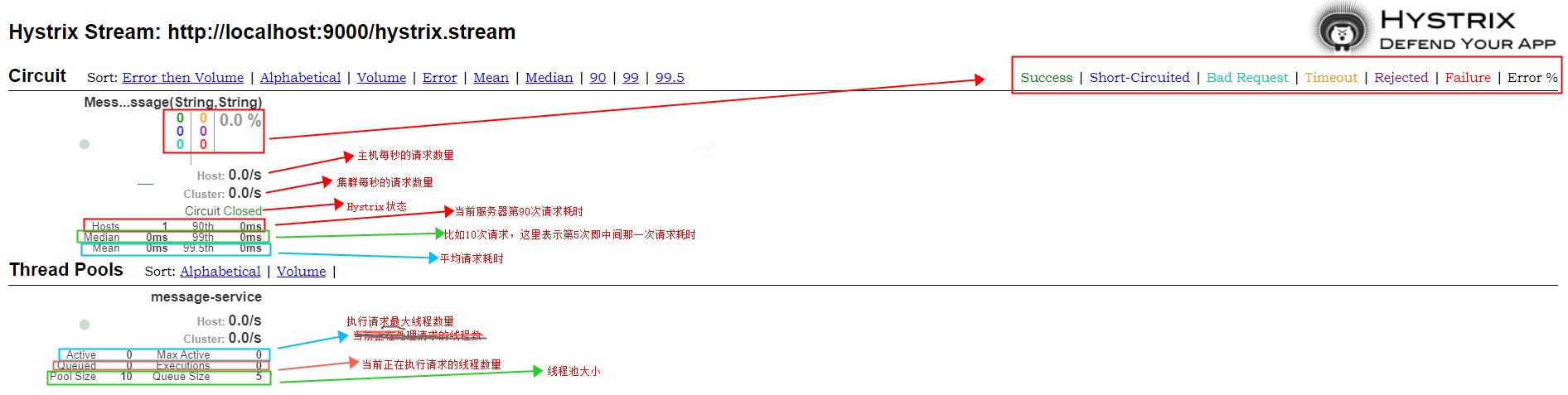
Hystrix Dashboard使用步骤
Hystrix Client依赖hystrix-metrics-event-streamHystrix Client注册HystrixMetricsStreamServlet- 监控微服务依赖
spring-cloud-starter-netflix-hystrix-dashboard - 监控微服务利用
@EnableHystrixDashboard开启仪表盘
-
pom.xml配置依赖<dependency> <groupId>com.netflix.hystrix</groupId> <artifactId>hystrix-metrics-event-stream</artifactId> <version>1.5.18</version> </dependency> -
注册
HystrixMetricsStreamServlet/** * hystrix对外提供数据接口 */ @Bean public ServletRegistrationBean hystrixServlet(){ HystrixMetricsStreamServlet servlet = new HystrixMetricsStreamServlet(); ServletRegistrationBean bean = new ServletRegistrationBean(servlet); //url bean.addUrlMappings("/hystrix.stream"); //实例名称 bean.setName("HystrixMetricsStreamServlet"); //启动顺序 bean.setLoadOnStartup(1); return bean; } -
监控微服务依赖
spring-cloud-starter-netflix-hystrix-dashboardpom.xml中添加依赖<?xml version="1.0" encoding="UTF-8"?> <project xmlns="http://maven.apache.org/POM/4.0.0" xmlns:xsi="http://www.w3.org/2001/XMLSchema-instance" xsi:schemaLocation="http://maven.apache.org/POM/4.0.0 https://maven.apache.org/xsd/maven-4.0.0.xsd"> <modelVersion>4.0.0</modelVersion> <parent> <groupId>org.springframework.boot</groupId> <artifactId>spring-boot-starter-parent</artifactId> <version>2.1.15.RELEASE</version> <relativePath/> <!-- lookup parent from repository --> </parent> <groupId>com.codesofun</groupId> <artifactId>hystrix-dashboard</artifactId> <version>0.0.1-SNAPSHOT</version> <name>hystrix-dashboard</name> <description>Demo project for Spring Boot</description> <properties> <java.version>1.8</java.version> <spring-cloud.version>Greenwich.SR6</spring-cloud.version> </properties> <dependencies> <dependency> <groupId>org.springframework.cloud</groupId> <artifactId>spring-cloud-starter-netflix-eureka-client</artifactId> </dependency> <dependency> <groupId>org.springframework.cloud</groupId> <artifactId>spring-cloud-starter-netflix-hystrix-dashboard</artifactId> </dependency> <dependency> <groupId>org.springframework.boot</groupId> <artifactId>spring-boot-starter-test</artifactId> <scope>test</scope> </dependency> </dependencies> <dependencyManagement> <dependencies> <dependency> <groupId>org.springframework.cloud</groupId> <artifactId>spring-cloud-dependencies</artifactId> <version>${spring-cloud.version}</version> <type>pom</type> <scope>import</scope> </dependency> </dependencies> </dependencyManagement> <build> <plugins> <plugin> <groupId>org.springframework.boot</groupId> <artifactId>spring-boot-maven-plugin</artifactId> </plugin> </plugins> </build> </project>application.properties中添加配置server.port=8081 spring.application.name=hystrix-dashboard eureka.client.service-url.defaultZone=http://localhost:8761/eureka/监控微服务利用
@EnableHystrixDashboard开启仪表盘,启动类中添加注解@EnableHystrixDashboardpackage com.codesofun.hystrix.dashboard; import org.springframework.boot.SpringApplication; import org.springframework.boot.autoconfigure.SpringBootApplication; import org.springframework.cloud.netflix.hystrix.dashboard.EnableHystrixDashboard; @SpringBootApplication @EnableHystrixDashboard public class HystrixDashboardApplication { public static void main(String[] args) { SpringApplication.run(HystrixDashboardApplication.class, args); } }
详细代码见仓库:https://gitee.com/xmlvhy/springcloud-learn
参考链接:http://www.itlaoqi.com/
本文作者: AI码真香
本文标题: SpringCloud入门系列之雪崩效应与熔断机制
本文网址: https://www.xmlvhy.com/article/90.html
版权说明: 自由转载-非商用-非衍生-保持署名 署名-非商业性使用4.0 国际 (CC BY-NC 4.0)
类似文章
| 0 评论
还没有评论,快来抢沙发吧!